
PLD FAQs
Find answers to common PLD questions, including how to log in to Zoom, fix Student iCON lockouts, and sync your device.
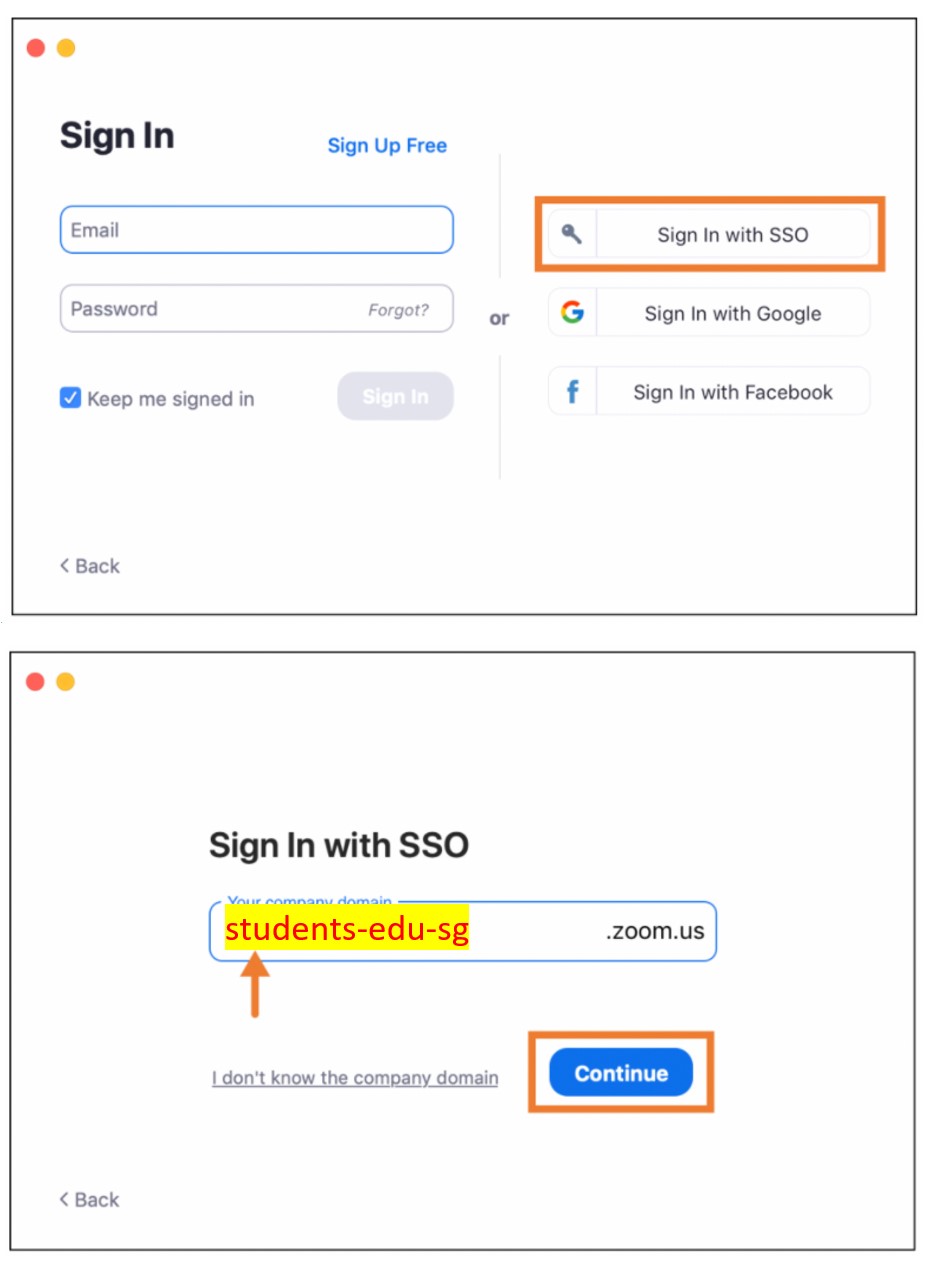
How do I login to Zoom on my PLD?
Open the Zoom app.
Sign in with SSO.
Enter students-edu-sg as the domain.
Click continue. You will be logged in automatically with your Student iCON email.
Why do I keep getting locked out of my Student iCON?
You keyed in a wrong password more than 3 times.
The current password to your PLD laptop login is different from your Student iCON. Please take note that,
PLD laptop login password = Student iCON password = Computer Lab laptop password.
Once we reset your password, please use the new password to login to your PLD and Student iCON.
You may have to sync your PLD if your password is different for all of these.You did not key in the correct Student iCON email address. Some of you might have a numerical suffix to your email (underscore _1 or _2 or any other number at the end of your name). Please double-check your email address.
How do I sync my PLD?
Please click here (opens in new tab) for the guide. Ensure that you have Internet connection.
After syncing, logout of your PLD and restart the device.
Login to your PLD with the correct password (must be the same as your Student iCON password).
Login to your Google Chrome again.